Every question in a checklist has two separate fields in its Question Settings panel: Max Score and Weight (%). Both affect the score, but they do different jobs. This article explains the difference and where the settings are.
Where Are These Settings?
- On the Checklists page, click Edit Checklist on the checklist's row
- On the Design tab, click a question
- In the Question Settings panel on the right, you will see the Max Score and Weight fields
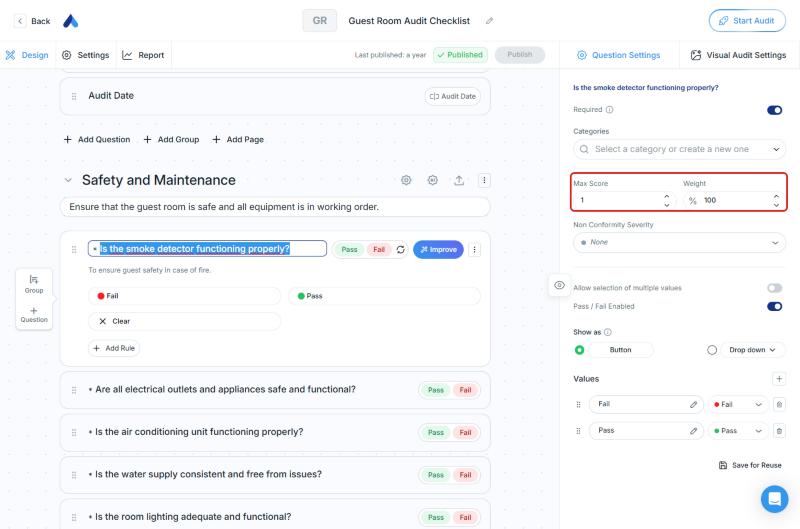
The Difference
| Field | What It Means | What It Is For |
|---|---|---|
| Max Score | The highest score the question can receive | Sets how many points the question is worth |
| Weight (%) | The question's share of importance in the overall score | Gives more impact to important questions (for example, safety-related ones) and less to others |
In short: Max Score sets the "value" of a question, and Weight sets its "importance" in the overall result.
You can also set weights at the page and group level. For details, see Scorable Checklists: Turn Audits into Measurable Performance Data.
Set Up Scoring and Score Thresholds
General score settings are in the Scoring section of the checklist's Settings tab:
- The Scoring Enabled switch turns scoring on or off for this checklist. It has a Premium badge next to it. The card below it lists Premium features, including weighted question evaluation
- Compliance Status Thresholds show the score ranges that decide the final result of an audit: Fail (below 70), Warning (70 to 89), and Pass (above 89)
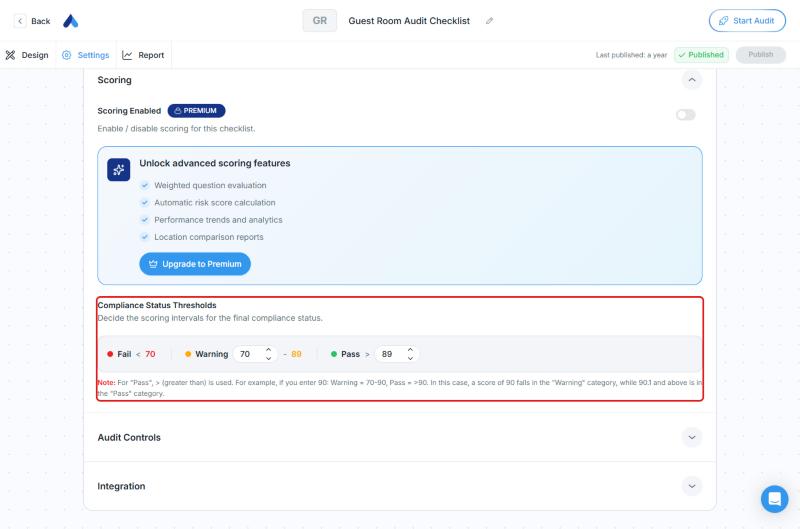
Note: For "Pass", "greater than" (>) is used. For example, if you enter 90, Warning is 70–90 and Pass is above 90. In this case, a score of 90 falls in the "Warning" category, while 90.1 and above is in the "Pass" category.
Frequently Asked Questions
Are weight and score the same thing? No. Max Score is the highest score a question can receive. Weight is the question's share of importance in the overall score.
Where can I change weights? At the question level, in the Question Settings panel. For page and group weights, see the steps in the Scorable Checklists article.
Where do I change the score thresholds? In the checklist's Settings → Scoring → Compliance Status Thresholds section.
Why does scoring have a Premium badge? A Premium badge appears next to the Scoring Enabled switch in the Scoring section. To see what is available on your plan, check the plan comparison on Settings → Billing & Subscription.
Best Practices
- Decide first which questions matter most for the result, then set Weight values accordingly
- Set the score thresholds to the level your organization accepts
- After you make changes, remember to click Publish
Next steps
Learn more about scoring, and about page and group weights.
Next article: Scorable Checklists: Turn Audits into Measurable Performance Data →