If you cannot create a checklist with AI or from a PDF, first check the points below. If the problem continues, write to the support team.
If Create Using AI Does Not Work
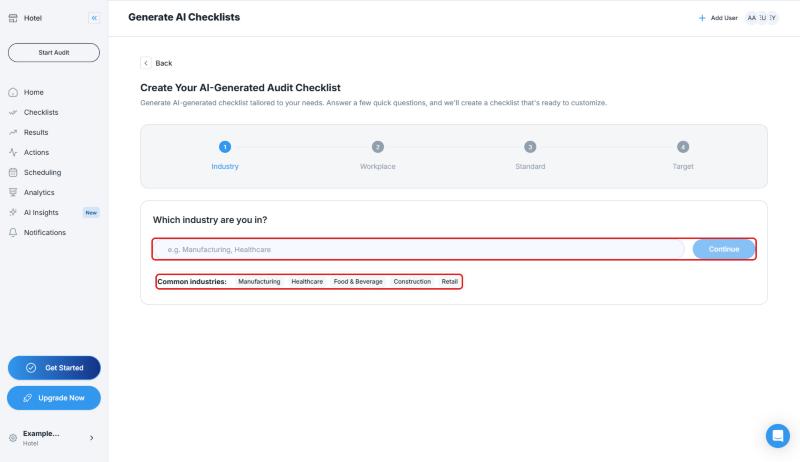
The wizard has four steps: Industry, Workplace, Standard, and Target. In each step you can click one of the suggestions or type your own answer.
- Make sure you fill in the field in every step. The Continue button stays disabled (gray) while the field is empty
- On the last step, type an answer to the question about what you are auditing. The button that creates the checklist stays disabled until you enter an answer
- After you click the button, wait without closing the page
If Convert PDF to Checklist Does Not Work
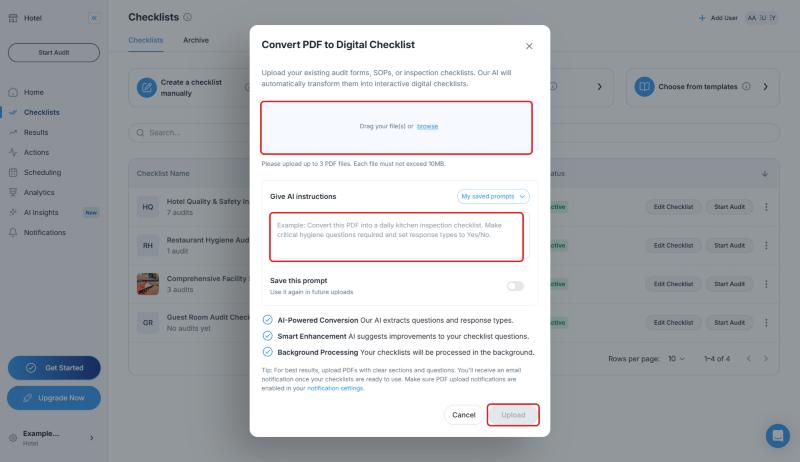
- Make sure you use a PDF file. You can upload up to 3 PDF files, and each file must not exceed 10MB
- After you select the file, click Upload. The button is disabled until a file is selected
- The conversion is processed in the background. You will be notified by email when your checklist is ready. Make sure PDF upload notifications are enabled in your notification settings
- For the best results, upload PDFs with clear sections and questions
For details, see Import Your SOP Document or PDF Checklist and Use AI to Generate a Tailored Checklist.
If the Problem Continues: What to Send to the Support Team
Write to the support team with:
- Which way you used: Create using AI or Convert PDF to Checklist
- What you typed as answers in the wizard, or the PDF file's name, size, and page count
- The error message you see, and a screenshot if possible
- When the problem happened
With this information, the team can look into the problem faster.
Frequently Asked Questions
How long does AI take to prepare a checklist? This article does not give a time. The PDF conversion is processed in the background and you are told by email when it is ready.
What else can I do? To find a ready-made template, use Choose from templates. To build one from scratch, use Create a checklist manually.
Best Practices
- In the wizard, write your industry, standard, and what you audit clearly
- Use readable headings and numbered questions in your PDFs
Next steps
Learn the other ways to create a checklist.
Next article: Use AI to Generate a Tailored Checklist →