When you need help in Audit Now, you have three options: write to the support team with in-app chat, search the help center on your own, and contact the sales team for the Enterprise plan.
Get Support with In-App Chat
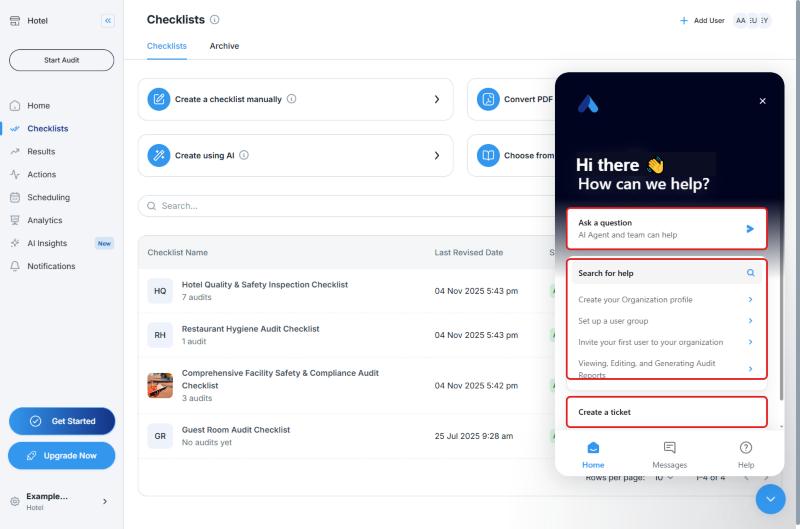
- In the web dashboard, click the help bubble in the lower-right corner
- In the window that opens, you will see:
- Ask a question: Our AI Agent and team can help
- Search for help: Search the articles in the help center
- Create a ticket: Send a support ticket to our team
- At the bottom of the window you will find the Home, Messages, and Help tabs
Tip: When you write to support, include what the problem is, which page you were on, and a screenshot if you have one. This helps you get an answer faster.
Support Options by Plan
According to the plan comparison on Settings → Billing & Subscription:
| Support Feature | Free | Premium | Enterprise |
|---|---|---|---|
| Help Center | Yes | Yes | All Premium features |
| Chat support | Yes | Yes | Dedicated support |
| Email support | Yes | Yes | Dedicated support |
| Priority support | No | Yes | Dedicated support |
Contact Sales for the Enterprise Plan
Pricing for the Enterprise plan is not shown in the app. On the Settings → Billing & Subscription page, use the Contact Sales button on the Enterprise card.
You can find other plan information, such as Premium and limited seats, on the plan cards on the same page.
Frequently Asked Questions
How do I reach customer service? In the web dashboard, click the help bubble in the lower-right corner, then choose Ask a question or Create a ticket.
How do I get pricing for the Enterprise plan? On the Billing & Subscription page, click Contact Sales on the Enterprise card.
Can I look for an answer myself first? Yes. Use the Search for help field in the help bubble, or the help center.
Best Practices
- Mention the name of the checklist or audit in your support request
- Search the help center first. Many questions are answered in the articles
Next steps
Browse the articles in the help center.
Next article: User Roles in Audit Now →