In Audit Now you can delete your account from the Profile page. When you delete your account, you transfer your data to another user. This article explains where to click and how Transfer and Delete Account differs from Delete Organization.
Delete Your Account
- Open the account menu in the lower-left corner and click Profile. The My Profile page opens
- Scroll to the bottom of the page. You will see two red sections
- In the Transfer and Delete Account section, click the Delete button
- Follow the instructions that open on screen
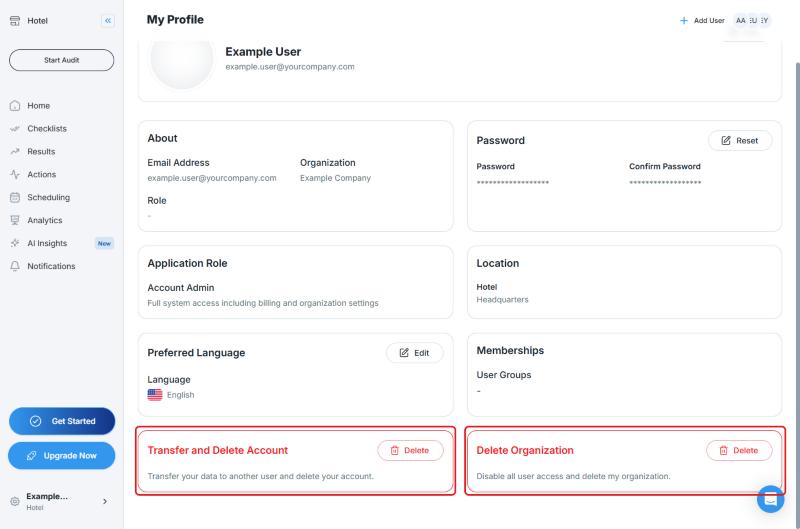
The description of the Transfer and Delete Account section says: "Transfer your data to another user and delete your account."
Before you delete your account, decide which user will receive your data.
Transfer and Delete Account Is Not the Same as Delete Organization
| Section | What It Does |
|---|---|
| Transfer and Delete Account | Deletes only your own account, and you transfer your data to another user |
| Delete Organization | "Disable all user access and delete my organization." This affects every user in the organization, not only your own account |
Warning: If you only want to delete your own account, click Transfer and Delete Account, not Delete Organization.
Frequently Asked Questions
Do I need to be an administrator to delete my account? No. Every user can delete their own account from the Transfer and Delete Account section on the Profile page.
What happens to my data when I delete my account? According to the description of the Transfer and Delete Account section, you transfer your data to another user.
I cannot see the delete button. Make sure you have scrolled to the bottom of the Profile page. If the problem continues, write to the support team.
I want to delete the whole organization. There is a Delete Organization section for that. It disables access for all users, so use it carefully.
Best Practices
- Before you delete your account, decide which user will receive your data
- If you only plan to delete your own account, do not touch the Delete Organization section
Next steps
Learn how to manage your profile.
Next article: Manage Your User Profile →